Getting Started
Welcome to TWD (Test While Developing)! This guide will help you set up TWD in your application and write your first test. TWD works with React, Vue, Angular, Solid.js, and other Vite-based frameworks.
Installation
Install TWD using your preferred package manager:
npm install twd-jsyarn add twd-jspnpm add twd-jsQuick Setup
TWD offers two setup options: the Standard Setup for full control, and the Simplified Setup (Bundled) for a cleaner, easier configuration.
Option 1: Simplified Setup (Bundled) - Recommended
The bundled setup is the easiest way to get started and works with all supported frameworks (React, Vue, Angular, Solid.js). It handles React dependencies internally and automatically initializes request mocking, keeping your main entry file clean and simple.
// src/main.tsx
import { StrictMode } from 'react';
import { createRoot } from 'react-dom/client';
import './index.css';
import App from './App';

// Only load the test sidebar and tests in development mode
if (import.meta.env.DEV) {
  const { initTWD } = await import('twd-js/bundled');
  const tests = import.meta.glob("./**/*.twd.test.ts");

  // Initialize TWD with tests and optional configuration
  // Request mocking is automatically initialized by default
  initTWD(tests, {
    open: true,
    position: 'left',
    serviceWorker: true,           // Enable request mocking (default: true)
    serviceWorkerUrl: '/mock-sw.js' // Custom service worker path (default: '/mock-sw.js')
  });
}

createRoot(document.getElementById('root')!).render(
  <StrictMode>
    <App />
  </StrictMode>,
);
Option 2: Standard Setup (React Only)
The standard setup gives you full control over the initialization and allows you to customize the sidebar component directly. This setup is only available for React applications. For Vue, Angular, Solid.js, and other frameworks, use the bundled setup above. You'll need to manually initialize request mocking if you plan to use API mocking.
// src/main.tsx
import { StrictMode } from 'react';
import { createRoot } from 'react-dom/client';
import './index.css';
import App from './App';
// Only load the test sidebar and tests in development mode
if (import.meta.env.DEV) {
// Use Vite's glob import to find all test files
const testModules = import.meta.glob("./**/*.twd.test.ts");
const { initTests, twd, TWDSidebar } = await import('twd-js');
// You need to pass the test modules, the sidebar component, and createRoot function
initTests(testModules, <TWDSidebar open={true} position="left" />, createRoot);
// Initialize request mocking (optional)
twd.initRequestMocking()
.then(() => {
console.log("Request mocking initialized");
})
.catch((err) => {
console.error("Error initializing request mocking:", err);
});
}
2. Set Up Mock Service Worker (Optional / recommended)
If you plan to use API mocking, set up the mock service worker:
npx twd-js init publicThis copies the required mock-sw.js file to your public directory.
3. Write Your First Test
Create your first test file:
// src/App.twd.test.ts
import { twd, userEvent, screenDom } from "twd-js";
import { describe, it } from "twd-js/runner";

describe("App Component", () => {
  it("should render the main heading", async () => {
    await twd.visit("/");

    // Use screenDom for testing library queries
    const heading = screenDom.getByRole("heading", { level: 1 });
    twd.should(heading, "be.visible");
  });

  it("should handle button clicks", async () => {
    await twd.visit("/");

    const user = userEvent.setup();
    const button = screenDom.getByRole("button");

    await user.click(button);

    // Add your assertions here
    const result = screenDom.getByText("Button clicked!");
    twd.should(result, "be.visible");
  });
});
4. Run Your App
Start your development server as usual:
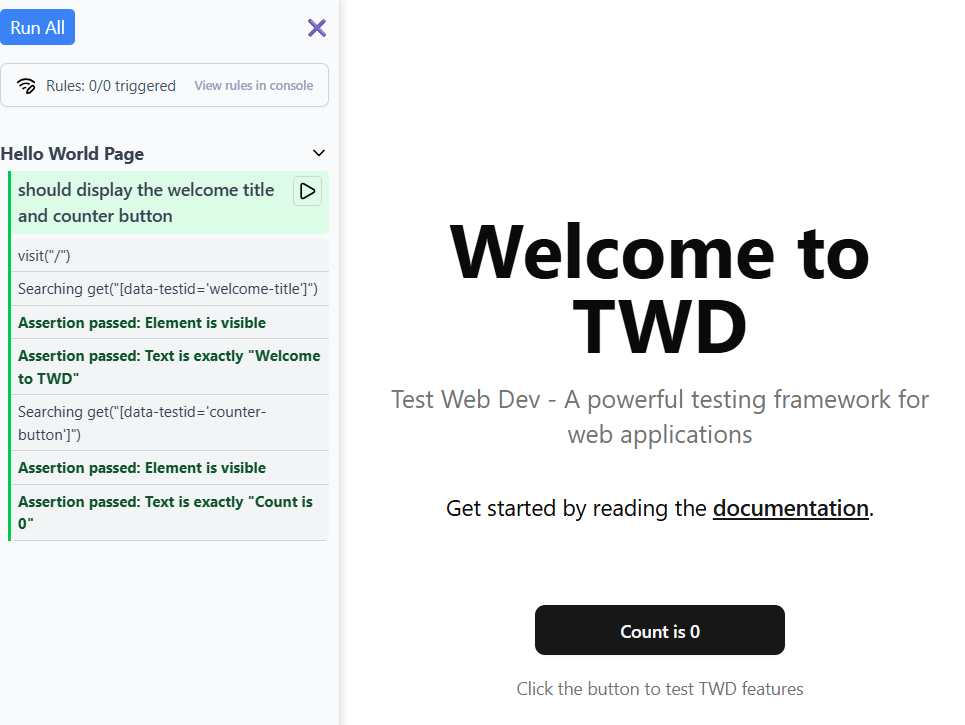
npm run devYou should now see the TWD sidebar in your browser automatically in development mode. Click on it to view and run your tests!
File Naming Convention
We recommend naming your test files using the following patterns:
*.twd.test.ts*.twd.test.tsx*.twd.test.js*.twd.test.jsx
You can customize this pattern in your test loader using different glob patterns.
Development Workflow
- Write tests alongside your components
- Run tests using the browser sidebar
- See instant feedback as you develop
- Mock APIs for integration testing
- Iterate quickly with live reloading
Next Steps
- Learn about Writing Tests in detail
- Explore API Mocking capabilities
- Follow the Tutorial for step-by-step learning
- Browse the API Reference for all available methods
Troubleshooting
Tests Not Loading
Make sure you:
- Are running in development mode (
import.meta.env.DEVis true) - Used the correct file naming pattern (
.twd.test.ts) - Have the
initTestslogic in your main entry file
Mock Service Worker Issues
If API mocking isn't working:
- Run
npx twd-js init publicto install the service worker - If using the standard setup, make sure you called
twd.initRequestMocking()in your main entry file (inside theimport.meta.env.DEVblock). Note: The bundled setup automatically initializes request mocking. - Check the browser console for service worker registration errors
Test Duplication on HMR
If you notice test entries duplicating when you edit test files during development (this typically happens when you have components initialized in your main.tsx), add the TWD HMR plugin to your Vite config:
// vite.config.ts
import { twdHmr } from 'twd-js/vite-plugin';

export default defineConfig({
  plugins: [
    // ... other plugins
    twdHmr(),
  ],
});
This plugin forces a full page reload when TWD test files change, preventing duplicate test entries.