🧪
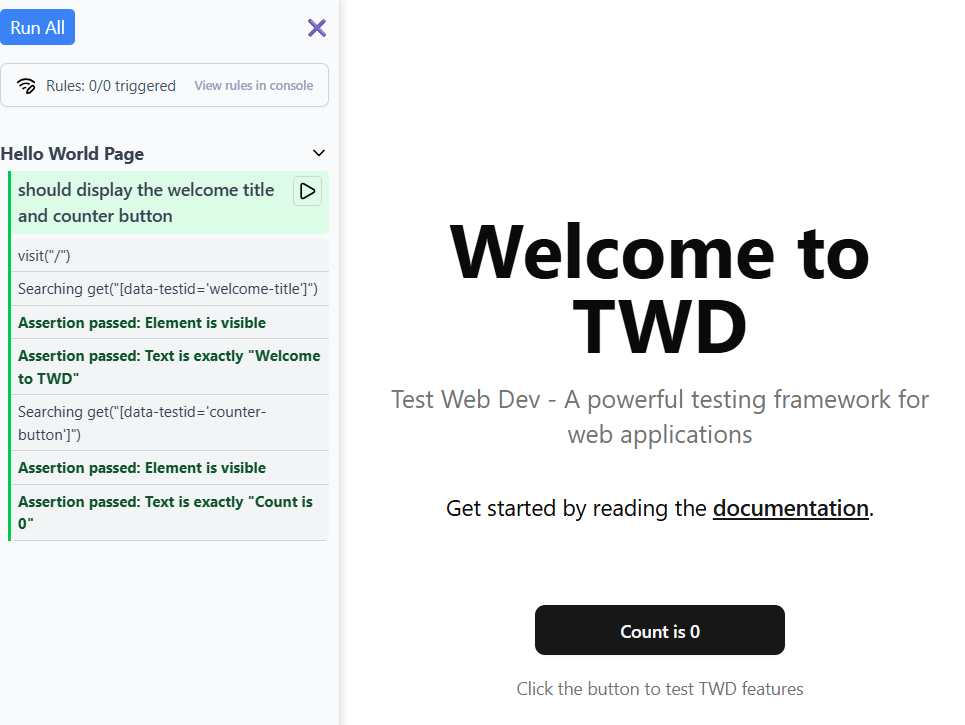
In-Browser Test Runner
Beautiful sidebar UI that runs tests directly in your browser with instant feedback as you develop.
because testing isn’t a phase, it’s part of the flow.
See TWD in action with the test sidebar running tests directly in your browser:
import { twd, userEvent, screenDom } from "twd-js";
import { describe, it } from "twd-js/runner";

describe("Hello World Page", () => {
  it("should display the welcome title and counter button", async () => {
    await twd.visit("/");

    // Use Testing Library queries (Recommended - semantic & accessible)
    const title = screenDom.getByRole("heading", { name: /welcome to twd/i });
    twd.should(title, "be.visible");
    twd.should(title, "have.text", "Welcome to TWD");

    const counterButton = screenDom.getByRole("button", { name: /count is/i });
    twd.should(counterButton, "be.visible");
    twd.should(counterButton, "have.text", "Count is 0");

    const user = userEvent.setup();
    await user.click(counterButton);
    twd.should(counterButton, "have.text", "Count is 1");

    // Alternative: Use TWD's native selectors
    // const title = await twd.get("h1");
    // title.should("be.visible").should("have.text", "Welcome to TWD");
  });
});TWD bridges the gap between development and testing by bringing tests directly into your development environment. Instead of running tests in a separate terminal, you can see results instantly in your browser's sidebar while you code.
Perfect for: